



Send and receive Unistream money transfers via UNIMobile App
ECONOMICS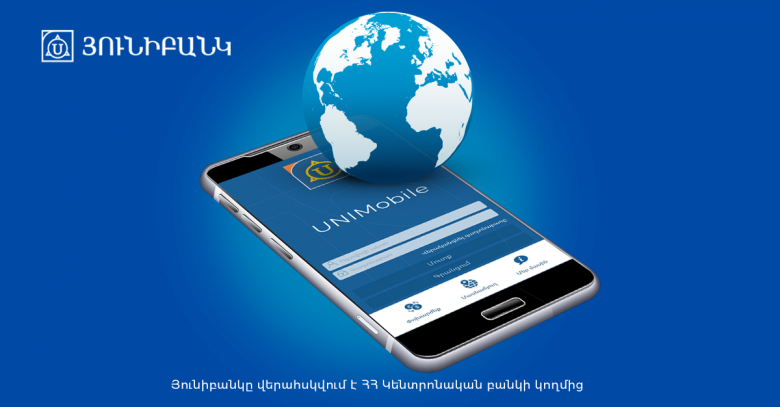
To make a money transfer, go to the "Unistream Money Transfers" section of the app and select the country and city, enter recipient's name, amount, currency, and the account number from which you want to send money.
The recipient of the money transfer can choose the account to which they want to receive money. All they have to do is to enter the transfer code, amount, currency, and account. If the transfer currency differs from the selected account currency, the sum is converted at the current exchange rate of Unibank.
The UNIMobile app can be downloaded from the App Store or Google Play. The app is available in Armenian, Russian, and English.

 Unibank Becomes Lead Sponsor of AGBU’s Global Run in Support of Camp Nairi
 Unibank’s Renamed “Tumanyan” Branch Opens at a New Location
 Ucom Continues Large-Scale Network Modernization, Expanding 5G Coverage and Enhancing Connectivity
 EBRD’s AMD-denominated bonds listed on AMX; Converse Bank acted as underwriter
 Become a Unibank shareholder and acquire perpetual bonds with a 13.25% yield
 The Unprecedented Educational Summer of the 'Armenian Virtuosos'
 All Armflix Content Is Once Again Available on Uplay
 Hayk Melikyan Opens the 5th Festival of Armenian Culture in Katowice
 Harutyun Harutyunyan: “The Government Has No Intention of Applying for EU Membership
and Adopted the Law to Prevent a Referendum”
Harutyun Harutyunyan: “The Government Has No Intention of Applying for EU Membership
and Adopted the Law to Prevent a Referendum” Ucom Supports Coca-Cola Fest 2026
  “Orran” Students Start the New Academic Year with Support from “The Power of One Dram”
 It is with deep awareness of the seriousness of this supposition as well as concern that we pose the question of the above headline
 “Armenian Virtuosos” Scholarship Recipients Take the Stage at the 4th International Festival of Youth Orchestras of the World
 Unibank Launches a New Promotion "U-Teenager": Grand Prize — a Summer Course at One of the Top Universities Abroad
 SEROOND Begins: Armenia’s First Authored School Model Based on Whole-Child Development, Enabled by AI
 "Unisport" Advances to the Main Round of the UEFA Futsal Champions League
 Cybersecurity Course Graduates Take Part in Ucom’s “Junior Academy” Program
 Ucom Introduces Green Tariff Plans, Turning Everyday Connectivity into Environmental Impact
 Ucom Launches “Unity Back to School” Special Offer for the New School Year
 Ucom’s Sales and Service Center Reopens at 7 Sayat-Nova Street in Gyumri
 "Unisport" Competes in the UEFA Futsal Champions League
 Aram Barseghyan Appointed CEO of Team Telecom Armenia, Hayk Yesayan to Lead Team Group
 Letter of Congratulations to His Holiness Karekin II on His 75th Birthday
 “Side by Side” Program for Artsakh Families in the Sevan Community: IDBank
 Arega Hovsepyan is our candidate for Chair of the Committee on European Integration
 The Final Round of the Junius Tournament Has Begun
 Awards Ceremony for the “Top 100 Students of Armenia” Competition: Presentation of Certificates
 New Samsung Galaxy A27 as Part of Ucom’s Special “Back to School 2026” Offer
 Millennials, Gen Z, or Gen Alpha: How Different Generations Prepare for the New School Year: Idram&IDBank
 Financial Literacy at the Republican Center for Children and Youth Tent Camp: Idram & IDBank
 Unlocking the Secrets of the Financial World at ''Hayordi'' Camp with Idram&IDBank
 Ucom Supports the Second Phase of ArmDrone’s FPV Drone Educational Program
 "The Power of One Dram" to "Orran" Charitable Non-Governmental Organization
 Ucom and Microsoft Innovation Center’s Cybersecurity Education Program Concludes with a Mini CTF Competition
 Customer Appreciation Day - This Time at IDBank’s “Erebuni” Branch
 Results of the Junius Tournament Announced: The Next Round Ahead
 Ucom Expands International Roaming Capabilities
 "Urgently Confirm Your Card Details": IDBank Warns of Hotel Booking Scams
 Mher Ananyan joins Unibank's Management Board
 Ucom Supports the Launch of "Remember the Animals" Educational Game
 Moody’s changes the outlook on IDBank’s ratings to positive
 IDBank Introduces the New Mastercard World Card with Exclusive Travel Benefits and a Special Launch Campaign
 Converse Bank and Visa expand their strategic partnership to introduce new customer solutions
  Ucom and FPWC Ensure Round-the-Clock Wildlife Monitoring in Gnishik Through Solar Energy
 Idram and IDBank Support Startups at Seaside Startup Summit
 It is now possible to register in Unibank’s mobile application through imID as well
 “Free In-Game Bonuses”: IDBank Warns About Cyberattacks Targeting Schoolchildren
 Moody's affirms Converse Bank's ratings and changes outlook to positive from stable
 New Achievements in Europe: "Armenian Virtuosos" Scholarship Recipients Embark on Educational Trips to Prestigious Music Academies
 Rate.Trading Platform at Seaside Startup Summit: IDBank Introduces an Innovative Solution
1
Unibank’s Renamed “Tumanyan” Branch Opens at a New Location
2
The Unprecedented Educational Summer of the 'Armenian Virtuosos'
3
EBRD’s AMD-denominated bonds listed on AMX; Converse Bank acted as underwriter
4
Become a Unibank shareholder and acquire perpetual bonds with a 13.25% yield
5
All Armflix Content Is Once Again Available on Uplay